Research Data Management#
Good research data management is an essential part of scientific practice. For each assignment, you will organize your files in a clear directory structure on your local drive.
Create a main folder called NBP_module. (replace module with a name related to the module)
Inside this folder, create three subfolders:
data
analysis
figures
Download the data and matlab files of the module. Store the data files in the data folder. Extract the matlab files, and store them directly in the analysis folder.
Then create a new MATLAB script named data_analysis.m and save it inside the analysis folder. You will use this script for all analyses related to this assignment. Your MATLAB script will use relative file paths (if you use the code from the following sections), meaning it looks for data and saves figures relative to where the script itself is stored. Therefore, the script must not be on MATLAB’s global search path. Instead, MATLAB should use the current folder containing your script.
When you first run your script, MATLAB will usually display a dialog window (see Fig. 86) asking whether to Change Folder, Add to Path, or Cancel.
Choose “Change Folder.” This sets MATLAB’s current working directory to your analysis folder, allowing the script to find your data and save figures correctly.
Do not choose “Add to Path.” If you accidentally do, close MATLAB and restart it before continuing. This resets the path and prevents later errors. If the window does not appear, manually set the current folder to your analysis directory using MATLAB’s Current Folder browser.
Once MATLAB is in the correct folder, the analysis code in the next sections will automatically know where:
your data are stored (../data/), and
where to save figures (../figures/).
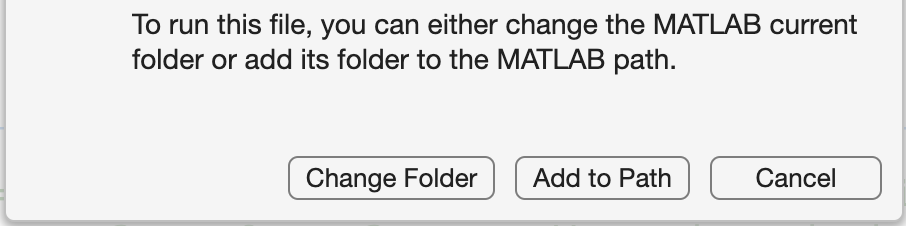
Fig. 86 When running code outside MATLAB’s path, MATLAB asks whether to change the current folder, add it to the path, or cancel. Choose Change Folder.#
do not add to path
Do not add folders to the MATLAB path.
All scripts in this course rely on relative paths to access data and figures.
If you add folders to the path, your code may no longer find the correct files.
Always ensure MATLAB’s current folder is set to the directory that contains your analysis script.